Windows desktop app / build 1.0.0

Every local business leaves a trail.

ScrapeRabbit turns nine local directories into one clean list of businesses, emails and social profiles. Run it on your PC. Export CSV or JSON. No per-lead meter.

09
local sources
CSV / JSON
ready to use
Local
data stays on your PC
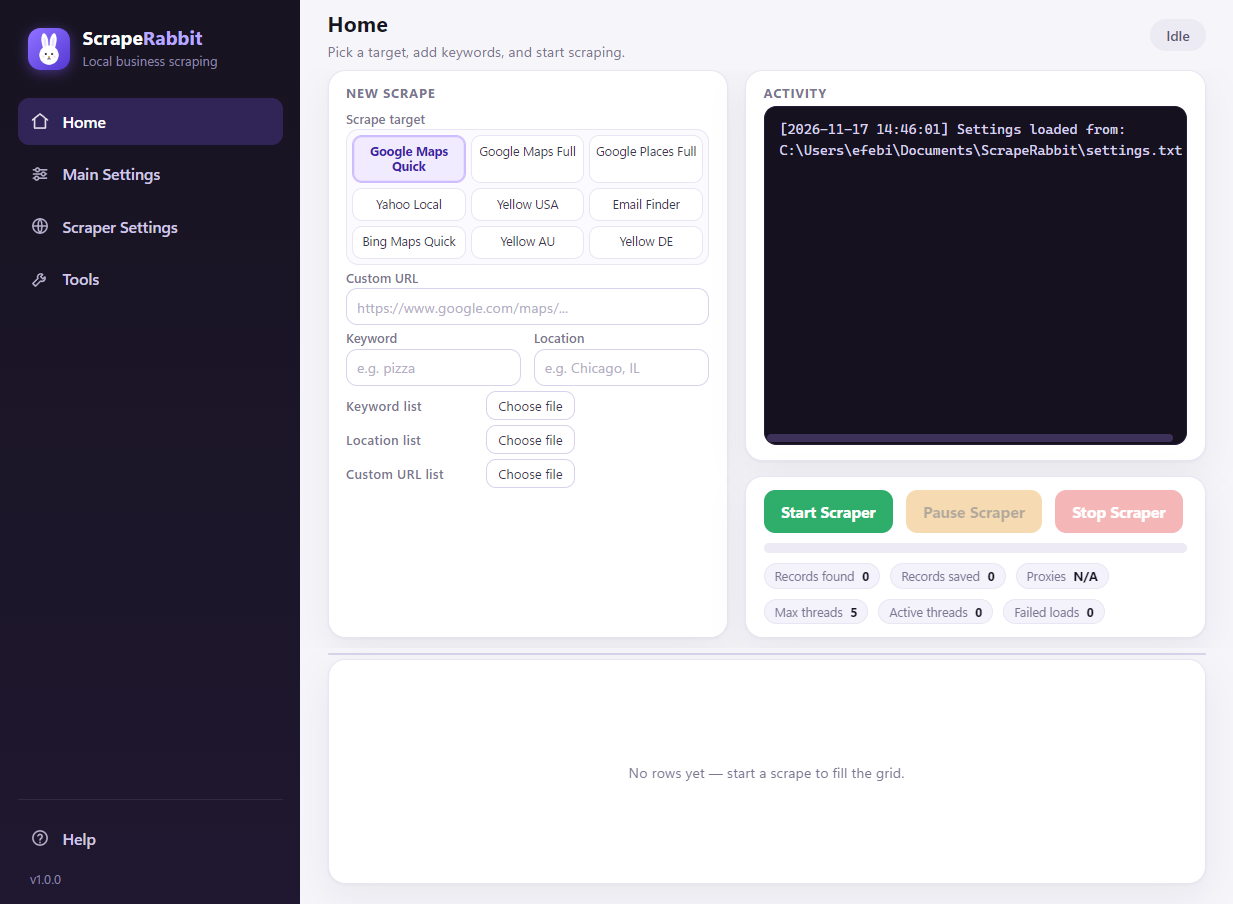
ScrapeRabbit desktop app showing a Google Maps search, a live activity log and a saved results grid.
example run 1,428 rows saved / CSV
example / email found hello@northside website checked
Google Maps Google Places Yahoo Local Yellow Pages US Yellow Pages AU Yellow Pages DE Bing Maps Email Finder

One run. Nine places to look.

Start with a keyword and a place, or hand ScrapeRabbit a specific search URL. It opens the source, collects the listings and writes the rows as it goes.

Google

Google Maps

02 modes

Quick gets the card data without opening every listing. Full opens each place for hours, reviews, website, CID and coordinates.

  • Quick for fast lists: name, address, category, rating.
  • Full for depth: phone, site, hours, review detail.
Google

Google Places

01 mode

Local-pack results and place details for service businesses, shops and restaurants.

Yahoo

Yahoo Local

01 mode

Listing pages with address, phone, hours, ratings and website data.

Yellow Pages

Yellow Pages

03 countries

The same familiar directory in three markets, with the columns each edition actually exposes.

US yellowpages.com AU yellowpages.com.au DE gelbeseiten.de
Bing

Bing Maps

01 mode

Local business cards with contact details, ratings and websites.

The extra step

Email Finder

05 columns

Give it a business website — or a list of them — and it looks for a contact email plus Facebook, Twitter, Instagram and LinkedIn profiles.

Search once. Leave with a list.

The app is built around one simple loop. No cloud workspace to learn, no records to buy one at a time.

  1. Pick a source

    Choose Google Maps, Places, Yahoo, Yellow Pages, Bing or Email Finder. Each target has its own scraper and its own column set.

  2. Describe the search

    Enter a keyword and location, load lists of both, or paste a custom search URL. Custom URLs replace the normal search for that run.

  3. Run and export

    Start, pause or stop whenever you like. Rows auto-save to CSV in a ScrapeRabbit Output folder; turn on JSON when you need metadata too.

ScrapeRabbit home screen with target selection, keyword fields, activity log and results grid.

The desktop app, not a dashboard. Everything runs in one window on your PC.

Built for people who sell to Main Street.

If your customers are local businesses, your next list is a search away. If you sell to consumers, this is not the tool for you.

Local SEO and GBP agencies

Build city-by-niche prospect lists for audits, profile cleanups and outreach — then export the contact route.

agency

Lead-gen and appointment-setting teams

Fill the top of the funnel with fresh local businesses instead of buying the same stale records.

outbound

MSPs and B2B service providers

Find offices, clinics and workshops by category and metro, with the website data you need to qualify them.

services

Commercial insurance and payment sellers

Segment local businesses by trade and location, then work the list with real contact context.

commercial

Nothing hidden under the hood.

Platform
Windows 10 and 11 desktop app
Sources
Google Maps Quick and Full, Google Places Full, Yahoo Local, Yellow Pages US/AU/DE, Bing Maps Quick, Email Finder
Output
CSV by default; optional JSON with run metadata and a results array
Browser
Bundled stealth Chromium, downloaded on first run
Scale controls
Max listings, worker threads, wait time, pause and stop
Network
Optional proxy file, API proxy modes, separate browser and email proxy rules
Automation
CLI mode, keyword/location lists, settings files, webhook, auto-close
Data location
Your own PC and the output folder you choose

Get in before the warren opens.

The Windows build is ready. The launch list gets the installer first, a direct line for feedback and founding pricing before public release.

  • All nine local sources
  • Email and social discovery
  • CSV and JSON export
  • Direct installer and update notes
current build / 1.0.0 Request the build

One Windows licence. No per-lead credits. Launch pricing is shared with the founding list.

Before you dig in.

Is ScrapeRabbit a cloud service?

No. It is a Windows desktop app. Searches, the browser and your output files run on your PC; there is no ScrapeRabbit dashboard holding your data.

Which sites can it scrape?

Google Maps Quick and Full, Google Places Full, Yahoo Local, Yellow Pages US, Yellow Pages AU, Yellow Pages DE, Bing Maps Quick and Email Finder. Each target has its own column set.

Does it find emails and social profiles?

Yes. With Find emails enabled, ScrapeRabbit visits each business website and looks for a contact email plus Facebook, Twitter, Instagram and LinkedIn links. The Email Finder target does the same for a list of websites.

Do I need proxies?

Not for a small run. For larger runs, or when a directory starts blocking your network, load a proxy list. HTTP, HTTPS, SOCKS4 and SOCKS5 are supported, plus ScraperAPI, ScrapingBee and ScrapeOps modes.

Can I automate the app?

Yes. CLI mode accepts keyword and location lists, a settings file, a save location, proxy credentials, webhook delivery and auto-close. The installed ScrapeRabbitCLI.cmd wrapper handles the Windows URL-argument quirk.

How is it licensed?

ScrapeRabbit is sold as a desktop licence, not by the record. Founding access gets launch pricing and the first installer. No cloud seat required to start a run.

What if a source changes its site?

Local directories change their markup. ScrapeRabbit has separate scrapers for each target so a change in one source does not take down the others; build updates address those changes.